Uninstalling the Sensor with 'Uninstall Protection' Enabled
If you have set up uninstall protection on an endpoint device or endpoint devices group, then you must provide a password to be able to uninstall the sensor.
Read more about Uninstall Protection, Advanced Tamper Protection for Windows and macOS
To uninstall the sensor, you must do the following:
- Generate a password.
- Use the password to uninstall the sensor.
1. Generate a password
- Navigate to the Endpoint Sensors page and click on Deployment group settings.
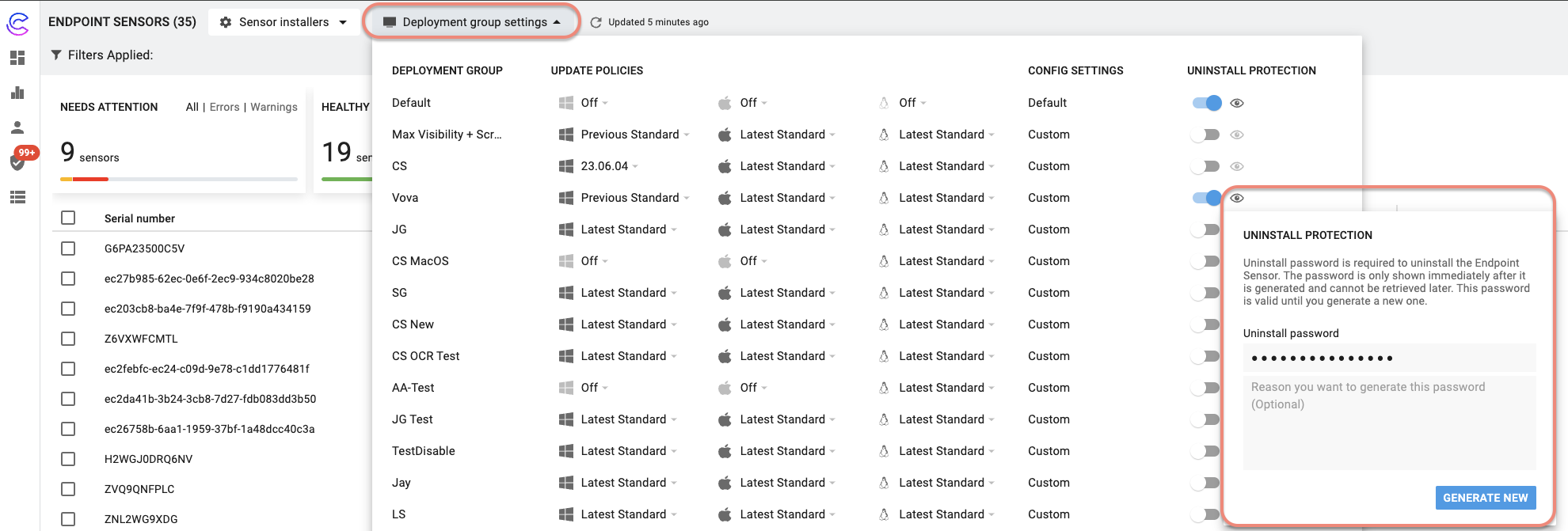
- Click on the eye icon next to the endpoint group that has Uninstall Protection enabled.
- Click Generate New in the Uninstall Protection dialog box, to generate a new password Then click Continue in the Confirmation dialog box. The new password is activated in 5 minutes. Simultaneously, the old password expires.
Copy the password to a notepad. This password is only displayed once, immediately after it is generated, and cannot be retrieved afterward.
2. Use the password to uninstall the Sensor
For Windows Users
Follow the command based on the mode to uninstall the sensor, manually or through an MDM solution.
Manually uninstall
Navigate to the directory that contains the .msi package and run the following command as an administrator.
msiexec.exe /X "Cyberhaven-<package-name>.msi" /quiet UNINSTALL_PASSWORD=1234-your-unique-password
For example:
msiexec.exe /X Cyberhaven-24.09.06.9660-3aec1e+.msi /quiet UNINSTALL_PASSWORD=l9kElp...pd3j
SCCM
Follow the steps to uninstall the Windows Sensor described in Uninstall Windows Sensor and provide the password you've generated in the uninstall command.
msiexec /uninstall {F6EB8228-FBA9-4FBC-87D7-A9972A03EE70} /quiet UNINSTALL_PASSWORD=1234-your-unique-password
Intune
To provide the uninstall password as a command line parameter, the .msi file must be packaged as a .intunewin file using this Microsoft guide and deployed as a Windows app (Win32).
For macOS Users
Run the following command manually or through a supported MDM solution.
sudo /Applications/Cyberhaven.app/Contents/MacOS/CyberhavenCtl uninstall [--password <password>]